• Skip to primary navigation
  • Skip to main content
  • Skip to primary sidebar
  • Skip to footer
projectsgeek

ProjectsGeek

Download Mini projects with Source Code, Java projects with Source Codes

  • Home
  • Java Projects
  • C++ Projects
  • VB Projects
  • PHP projects
  • .Net Projects
  • NodeJs Projects
  • Android Projects
    • Project Ideas
      • Final Year Project Ideas
      • JSP Projects
  • Assignment Codes
    • Fundamentals of Programming Language
    • Software Design Laboratory
    • Data Structure and Files Lab
    • Computer Graphics Lab
    • Object Oriented Programming Lab
    • Assembly Codes
  • School Projects
  • Forum

ProjectsGeek

Gas Agency System Project

October 23, 2017 by ProjectsGeek Leave a Comment

The gas agency system will automate the booking process of the gas connection. It will allow a client to book the gas through the internet. The gas agency system will be designed with the help of ASP .Net, C# and SQL server. The application will use the internet to provide all the function. If a user does not have the internet, then he/she cannot use this application. The software will have a good interface with the user-friendly environment to provide easy access to the system for the user. The user can get the new connection by use of gas agency system.

gas Agency System Project

Existing system

In the present gas agency system, a user has to call the distributor to book the gas. However, to get a new connection a person have to visit the gas agency. The agency then verifies the document provided by the user. The verification takes time, and due to this, the client has to suffer. The current process is too slow and prone to error. They maintain the user details manually on a sheet of paper which is not a secure procedure to maintain any information. The Person who has gas connection need to keep a diary in which they note the details of each booking, but if it gets misplace than creates a problem.

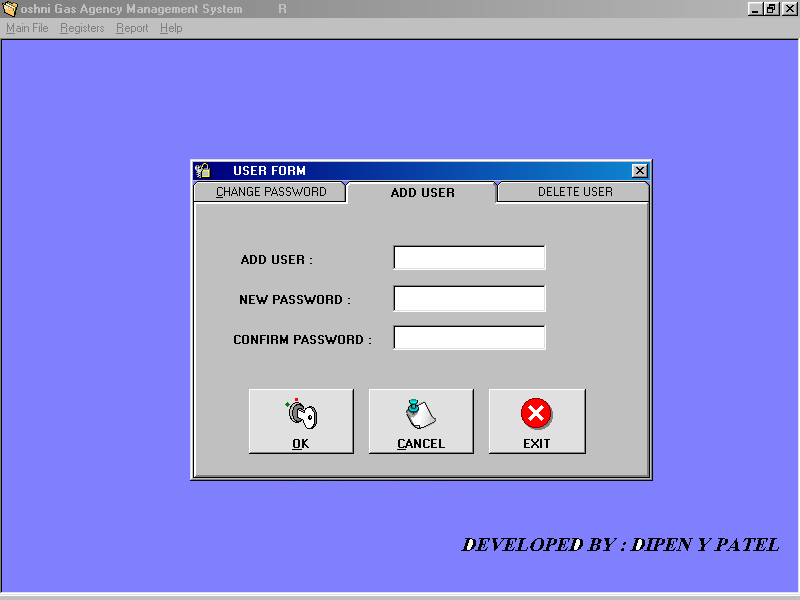
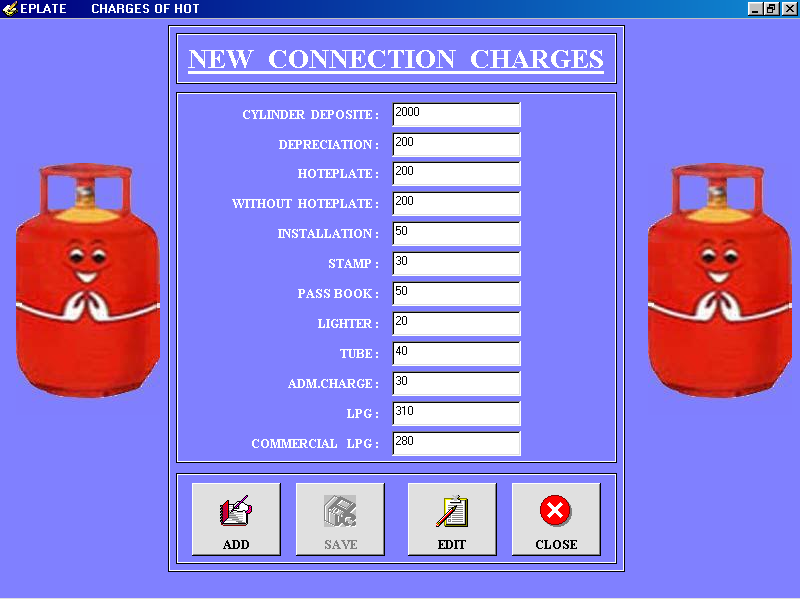
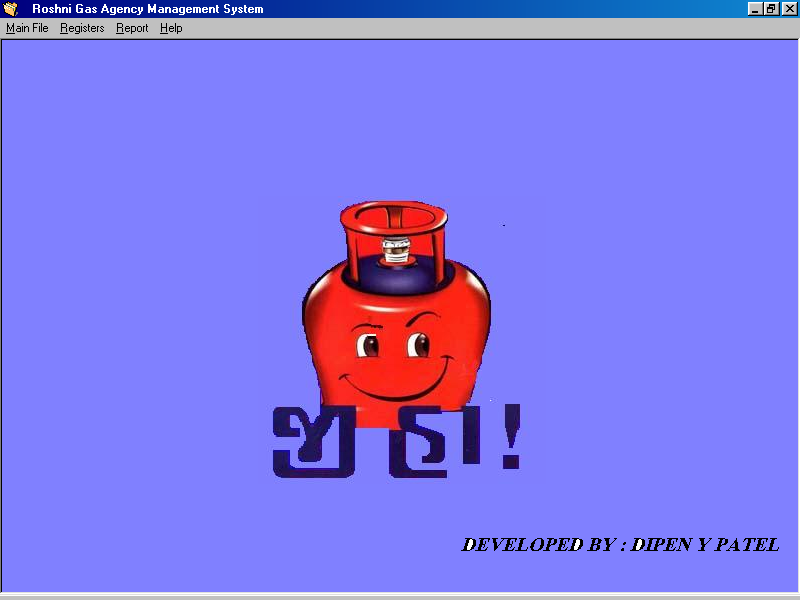
Gas Agency System Snapshots
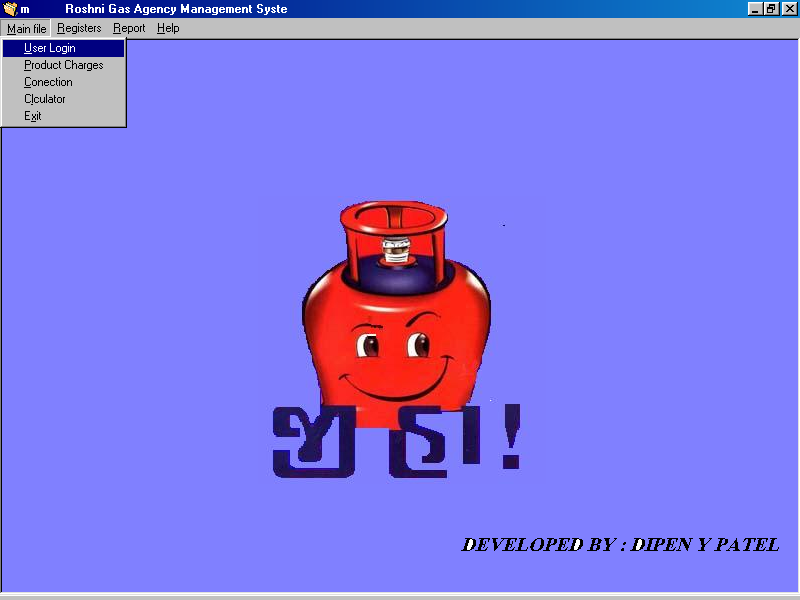
File details gas agency system add users gas agency system products gas agency system

Proposed system

In the proposed gas agency system, we use the internet to provide the gas service at home. The user can book the gas from our system. This project will also display the status of the current booking. If a user wants he/ she can store the information of the booking so that from the next time they can book the gas in one click. The information will be safe as it will need an ID and password to access the system. The gas agency will also maintain the user information through this scheme.

Module

Admin: The admin will be the person who owns the software. The admin will be authorized by the government and will have access to details of a user of the application.
User: The user will use the application and will access all the features provided in the system.
Distributor: The gas agency will use this module to maintain the consumer’s details.
Connection: This module will help new user to get the connection. The user will need to provide some information to the gas agency through a soft copy. The client can also book a gas connection.
Login: To get the access to the gas agency system the user will need to enter the ID and password.

Software requirement

  • Operating system: Windows XP with SP 2 or above.
  • Database: MS SQL server 2005.
  • Technology: ASP .NET with C# .net
  • IDE: MS Visual Studio .NET 2008

Hardware requirement

  • Hard disk: 20 GB Minimum.
  • RAM: 512 MB Minimum.
  • Processor: Pentium 4 or above.

Download Project

Gas Agency System Report Gas Agency System
Gas Agency System PPT PPT Download
Gas Agency System Code Source Code Download
Abstract for Gas Agency System Abstract Download

Other Projects to Try:

  1. Secure LAN Communicator Project
  2. Address Book Project with Source Code
  3. Advertising Agency Management System
  4. Advertising Agency system project in Java
  5. Smart Gas Pipe Leakage Detector System IOT Project

Filed Under: .Net Projects Download Tagged With: .Net Projects Download

Declaring Constructors in TypeScript Angular 2

September 23, 2017 by ProjectsGeek Leave a Comment

How to Declare Constructors in TypeScript Angular 2


Constructors in TypeScript

In this post we will see how to create a constructors in TypeScript angular 2. S0 here we have same Point class which we used in tutorial for declaring class in Typescript.  Only code we added is for the constructor as given below. 

We can declare a constructor in TypeScript using ‘constructor’ keyword and we can have only one constructor. If you are using java you have feature of having multiple constructors inside a class but in typescript you can have only one constructor.  

class Point {
    
        x: number;
        y: number;

        constructor(x:number,y:number){
            this.x=x;
            this.y=y;
        }

        doSomething() {
            console.log('Point X: '+this.x);
            console.log('Point Y: '+this.y);
        }
    
    }

Lets run this above code to see the output.

PS C:\Users\AnilKumar\ts-hello> tsc code-main.ts
PS C:\Users\AnilKumar\ts-hello> node code-main.js
Point X: 1
Point Y: 2
PS C:\Users\AnilKumar\ts-hello>

How to make Constructor Optional in TypeScript?

We can use ‘?‘ to make a constructor parameter optional.

NOTE: All parameters right to optional parameter also need to be changed to optional else it will show you compilation error message.

class Point {
    
        x: number;
        y: number;

        constructor(x?:number,y?:number){
            this.x=x;
            this.y=y;
        }

        doSomething() {
            console.log('Point X: '+this.x);
            console.log('Point Y: '+this.y);
        }
    
    }

let point: Point;
point = new Point(1);

point.doSomething();

In above code we are passing only one parameter in constructor which is acting like a overloaded constructor feature only. Now lets run this code.

PS C:\Users\AnilKumar\ts-hello> tsc code-main.ts
PS C:\Users\AnilKumar\ts-hello> node code-main.js
Point X: 1
Point Y: undefined
PS C:\Users\AnilKumar\ts-hello>


Other Projects to Try:

  1. Declaring Interface in TypeScript Angular 2
  2. Declaring Classes in TypeScript Angular 2
  3. Difference between VAR and LET Angular 2
  4. Public and Private Keywords
  5. Chat Server project in Java

Filed Under: Angular 2 Tagged With: Angular 2

Declaring Classes in TypeScript Angular 2

September 23, 2017 by ProjectsGeek Leave a Comment

How to Declare Classes in TypeScript Angular 2

Classes in TypeScript

In this post we will see how to declare a class in TypeScript angular 2. In this below code window you can see we have declared class Point with two variables ‘x’ and ‘y’. We have one method also inside Point class which will print both the point values of object.

class Point {
    
        x: number;
        y: number;

        doSomething() {
            console.log('Point X: '+this.x);
            console.log('Point Y: '+this.y);
        }
    
    }

Initializing the Class in TypeScript

In this below code snippet we are creating one variable point with is of Type Point class. Then we are allocating memory or creating object of type Point by using new keyword like any other object oriented language.

let point: Point;
point = new Point();
point.x=1;
point.y=2;
point.doSomething();

We are using point variables to assign values to object variables ‘x’x and ‘y’. At the end we are calling doSomething() method of point object we just created. Below is the result of above code.

let point: Point;
point = new Point();
point.x=1;
point.y=2;
point.doSomething();


Other Projects to Try:

  1. Declaring Interface in TypeScript Angular 2
  2. Declaring Constructors in TypeScript Angular 2
  3. Public and Private Keywords
  4. TestPage
  5. Difference between VAR and LET Angular 2

Filed Under: Angular 2 Tagged With: Angular 2

Declaring Interface in TypeScript Angular 2

September 23, 2017 by ProjectsGeek Leave a Comment

Interface in TypeScript

Interface in TypeScript

In this post we will see how to declare Interface in TypeScript and the using this interface for passing objects to function.

In below code we have interface Point which have defining of holding two variables ‘x’ and ‘y’ with the data type number. Then we have one function doSomething() which is accepting point object of type Point interface.

interface Point {

    x: Number,
    y: Number
}

let doSomething = function(point: Point) {
    console.log('Point X: '+point.x);
    console.log('Point Y: '+point.y);
}


doSomething({x:1,y:2});

At the last line we have calling function doSomething()  with the object.

How to create object in Typescript ?

As in this case we have two variables inside class or interface of type number.

{
           x:1,
           y:2

}

Now run this code using node.

PS C:\Users\AnilKumar\ts-hello> tsc code-main.ts
PS C:\Users\AnilKumar\ts-hello> node code-main.js
Point X: 1
Point Y: 2
PS C:\Users\AnilKumar\ts-hello>

Other Projects to Try:

  1. Declaring Classes in TypeScript Angular 2
  2. Declaring Constructors in TypeScript Angular 2
  3. TestPage
  4. Public and Private Keywords
  5. Difference between VAR and LET Angular 2

Filed Under: Angular 2 Tagged With: Angular 2

Difference between VAR and LET Angular 2

September 23, 2017 by ProjectsGeek Leave a Comment

In this post we will see how var keyword in type script is different from let keyword. We will use very simple program to explain the difference between var vs let keywords in angular 2 typescript.

VAR Keyword Usage

We will write a simple program with var keyword as give below

function doSomething(){
    
    for(var i=0;i<5;i++){
        console.log(i);
    }

    console.log('Finally ' + i);
}


doSomething();

Run this below command to compile type script

PS C:\Users\AnilKumar\ts-hello> tsc code-main.ts

Run the code-main.js file using node.js

PS C:\Users\AnilKumar\ts-hello> node code-main.js
0
1
2
3
4
Finally 5
PS C:\Users\AnilKumar\ts-hello>

Variable ‘i’ is declared inside loop but still we can use it outside loop which make its available for other code as well inside doSomething() function.

LET Keyword Usage

We will change the keyword var –> let as given below.

function doSomething(){
    
    for(let i=0;i<5;i++){
        console.log(i);
    }

    console.log('Finally ' + i);
}


doSomething();

Again compile the code as we did earlier.

PS C:\Users\AnilKumar\ts-hello> tsc code-main.ts
code-main.ts(9,30): error TS2304: Cannot find name 'i'.

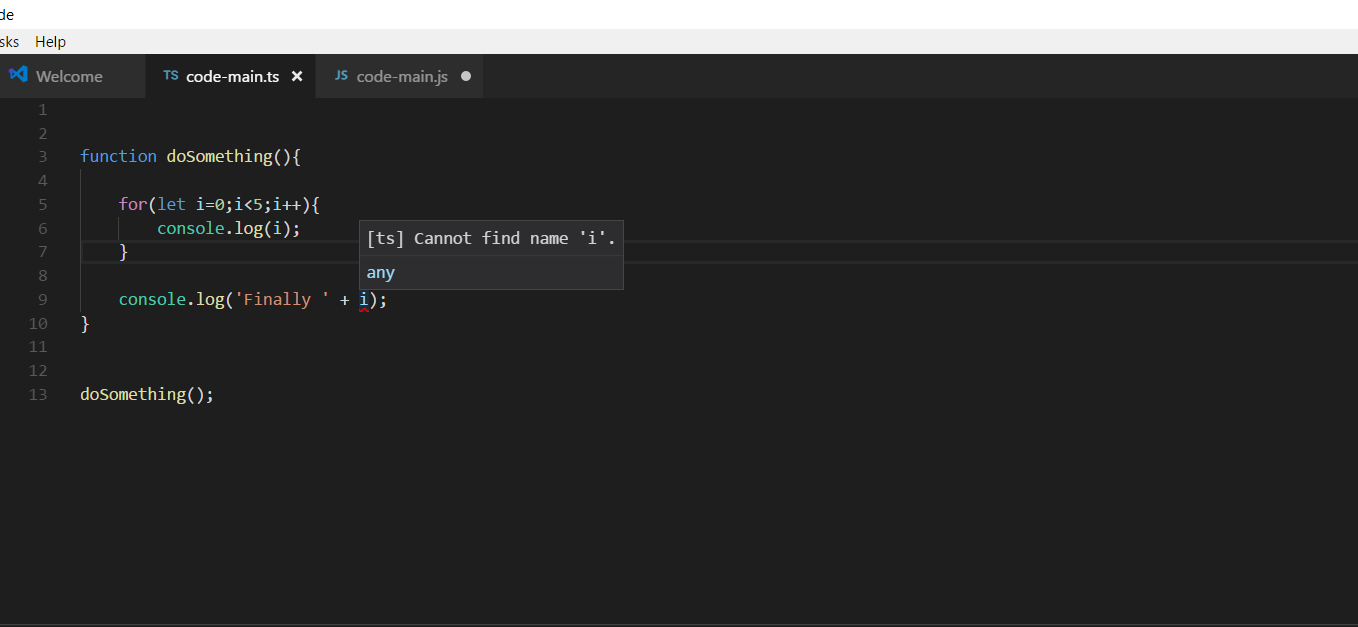
We have compilation error which suggest variable ‘i’ is not visible outside loop that means scope is limited to nearest scope. We can this error in visual studio code as well when writing code.

You can see outside loop variable is marked error and you can see error message if you hover mouse pointer on it.


var and let Angular 2


Other Projects to Try:

  1. Public and Private Keywords
  2. Set operations – Union, Intersection, Difference, Symmetric Difference using C
  3. Search Result
  4. Declaring Interface in TypeScript Angular 2
  5. Declaring Classes in TypeScript Angular 2

Filed Under: Angular 2 Tagged With: Angular 2

Auction of Assets Project with Source Code

September 23, 2017 by ProjectsGeek Leave a Comment

The main objective of the Auction of Assets project is to automate the bidding process which is done manually. This will remove all the inconsistencies involved in the auction process. Moreover the bidders will be intimated beforehand about the bidding process and products which are to be auctioned. This will save a lot of energy and time and whole system will become transparent and easy to operate.   The main objective of the Auction of Assets project is to automate the bidding process which is done manually. This will remove all the inconsistencies involved in the auction process. Moreover the bidders will be intimated beforehand about the bidding process and products which are to be auctioned. This will save a lot of energy and time and whole system will become transparent and easy to operate.  

Auction of Assets Project


Existing Auction of Assets System

The existing Auction of Assets system is manual driven. A dedicated man power is required for collecting the bids from individual bidder. A lot of time and energy is wasted over looking at each bid and finding out the winner. It becomes lethargic and tedious job. Moreover, the system doesn’t guarantee 100% transparency and authenticity. This seriously questions the credibility of the system. Adding to it, bidder get to know about auction through newspapers only and sometimes bidders aren’t informed in time. So to rule out all the redundancies and inconsistencies caused due to manual bidding system there is an urgent need to automate the system.

Proposed Auction of Assets system

The proposed Auction of Assets system will completely automate the auctioning and bidding process. Any number of products can be auctioned under one roof as the software provides different categories for the products. The user can bid under any particular category of product as requested by the admin. Secondly, the user will be intimated online about the bidding process beforehand and permission will be granted to place the bid. As the bids are placed online, the winner can be declared as soon as the bid closes for that particular product.                             

Auction of Assets System specifications

Modules

The software is two major modules:

1. Admin Module:  Admin is the main controlling part of the software. After providing login credentials, an admin can enter have the access of GUI. He has authority to add the category and intimate the users about bidding process. He can grant or revoke permissions to the users for any asset under the category and all the evaluation of the bidding is done by him. Admin can view all the bid and members information.

2. Member Module: Each member is given username and password through which they get access to the member area. Members will be notified here in case admin has sent a request for a bid. The user will place a bid higher than the minimum bid value set by the admin. A member can edit and update his personal information as well as password.

Hardware configuration 

  • Processor Pentium IV
  • RAM min 1 GB (2 GB recommended)
  • Hard disk min 20GB (40 GB Recommended)
  • Floppy drive 1.44 MBCD drive LG 52X
  • Key board Standard 102 keys
  • Mouse 3 buttons

Software configuration

  • Operating system Windows XP SP2 or Windows Vista
  • Language ASP .NET with C# .NET
  • Back end MS-SQL Server 2005
  • Browser IE
  • IDE MS Visual Studio .Net 2008

Download Project

Abstract Download Source Code Download Database Download

Other Projects to Try:

  1. Auto Auction System Project in PHP
  2. Simple Dynamo Android Project with Source Code
  3. 100+ .Net mini Projects with Source Code
  4. E-Gift Shoppy Project with Source Code
  5. Address Book Project with Source Code

Filed Under: .Net Projects Download Tagged With: .Net Projects Download

  • « Go to Previous Page
  • Page 1
  • Interim pages omitted …
  • Page 19
  • Page 20
  • Page 21
  • Page 22
  • Page 23
  • Interim pages omitted …
  • Page 135
  • Go to Next Page »

Primary Sidebar

Tags

.Net Projects Download Android Project Ideas Android Projects Angular 2 Assembly Codes C # Projects C & C++ Projects C++ Projects Class Diagrams Computer Graphics Database Project Data Mining Projects DataScience Projects Datastructure Assignments Download Visual Basic Projects Electronics project Hadoop Projects Installation Guides Internet of Things Project IOS Projects Java Java Interview Questions Java Projects JavaScript JavaScript Projects java tutorial JSON JSP Projects Mechanical Projects Mongodb Networking Projects Node JS Projects OS Problems php Projects Placement Papers Project Ideas Python Projects seminar and presentation Struts

Search this Website


Footer

Download Java Project
Download Visual Basic Projects
Download .Net Projects
Download VB Projects
Download C++ Projects
Download NodeJs Projects
Download School Projects
Ask Questions - Forum
Latest Projects Ideas
Assembly Codes
Datastructure Assignments
Computer Graphics Lab
Operating system Lab
australia-and-India-flag
  • Home
  • About me
  • Contact Form
  • Submit Your Work
  • Site Map
  • Privacy Policy