• Skip to primary navigation
  • Skip to main content
  • Skip to primary sidebar
  • Skip to footer
projectsgeek

ProjectsGeek

Download Mini projects with Source Code, Java projects with Source Codes

  • Home
  • Java Projects
  • C++ Projects
  • VB Projects
  • PHP projects
  • .Net Projects
  • NodeJs Projects
  • Android Projects
    • Project Ideas
      • Final Year Project Ideas
      • JSP Projects
  • Assignment Codes
    • Fundamentals of Programming Language
    • Software Design Laboratory
    • Data Structure and Files Lab
    • Computer Graphics Lab
    • Object Oriented Programming Lab
    • Assembly Codes
  • School Projects
  • Forum

Uncategorized

Intranet Chatting System project in Java

November 14, 2014 by ProjectsGeek

Intranet Chatting System project in Java


Project Objective

Intranet chatting system facilitates distributed processing within an organization. It allows communication between two users and simultaneous communication between many users with the concept of group chat. It’s the system, where users have to register themselves to use this system and start chatting. There are various features which been seen while using this system and these are: sending message with smileys, sending friend request to other users or by using their particular address or user’s code, check who are available online and using their settings panel to manage their overall communication process. Among many features, there are some advanced features which has been added to exist in this competitive market are voice recording and sending, sending attached documents etc.

Existing System

Existing system using the physical LAN connections to have communication with others but due to some security reasons and requirements of other expensive software to manage and control the ongoing communication process was quite expensive one. This existing system doesn’t having control over network connection so, there was a problem of data security and information mis-conduction process. To handle this existing system, more trained networking admin required to configure the network to tackle problems in some critical situations.

Proposed System

As this new intranet chatting system has been developed in different modules, so the entire communication process is controlled by the shat server. Messages to particular users will be viewed and received as per their friends list and authentications. Using this system admin will able to get more info like complete logged details of every users including the IP address of ach system. It’s the admin of the system which will also having the power to create backup of the messages for future reference and data log details for every node which are connected for communication establishment.

Modules

  1. Creating Users: -It’s the module by which new users can create their profile and assign their own user name and password for their account.
  2. Separate Login Process: -It’s the gateway from where all the users can make login to their account. Login system has also been enabled with session by which, if any users idle for particular time, they have to make login again.
  3. Chatting Server: – Chatting server is the servlet which will controlled the overall communication process with their own predefined rules.
  4. Message Dispatcher:- Message dispatcher will keep track of users account and identify where to send the message and what the message body will include to retain same information while dispatching to others side.

Download Project

 Intranet Chatting System Abstract  Download Abstract
 Intranet Chatting System Source Code  Download Source Code

Other Projects to Try:

  1. Online Chat System project in PHP
  2. Chat Server project in Java
  3. Voice Chat Server Final Year Project
  4. Online Chat Express project in Java
  5. Intranet Mailing System project in Java

Filed Under: Uncategorized

Employee Performance Assessment System

September 2, 2014 by ProjectsGeek Leave a Comment

Employee Performance Assessment System 


Project Abstract

Employee Performance Assessment SystemManagers of a particular team always want to rate their subordinates based on their performance. Employee performance and recognition system will allow managers to achieve this task in more convenient manner. Employee Performance Assessment System will help managers to rate and give points for working employees which can help them to make their search process easier for best available one. Rating can be performed on various parameters like availability, responsiveness, targets achieved which were given to them and much more. This rating will be used for employees which can help them to get promotions, extra bonus, incentives, and tour packages and to assign challenging tasks for their new upcoming projects. While preparing final report, all data can be accessed from centralize database thus no chances of redundancy and inaccuracy. All core committee members will able to get same information across different tables which will help them to make their final report.

Existing System

Existing Employee Performance Assessment System uses pen and paper to rate their working employees. Different forms need to be printed for different working environment and to check various parameters of an employee. Thus extra burden is given to the managers which sometimes creates difficulties to figure out the problems and select the right one. For carrying out any mathematical operation of selected data, it needs time and extra work to present the requested output.

Drawbacks

  1. It’s very difficult to maintain rating database information using paper sheet and extra cost involved in storing at safe place.
  2. Managers do not able to make comparison between working members based on their ratings.
  3. Extra manpower and time involved to prepare the final report.
  4. Security threat for the employee’s data and chances of redundant data.
  5. Difficulties in preparing graphical report and make future analysis.

Proposed System

As employees need to work on different projects at different locations. So to make a flexible Employee Performance Assessment System, this web application can be accessed from any location. Thus wherever they are working, their supervisor will able to feed data using common pattern which will be saved in central database.  Using the power of graphical query builder, database will be accessed from centralized location and required operation can be easily performed within few seconds. Now it will be easy with integrated CMS system to build graphical reports for future planning like providing training’s, identifying weak points, growth rate etc.

Benefits

  1. Only authorized person will able to access these type of secured data and make necessary operations as per requirement.
  2. Processing time reduced and fast availability of results as compared to manual system.
  3. Using built in features, requested data can be sended from one person to another through proper communication channel.
  4. It’s by default system will able to display the results in either ascending or descending order by taking rating data as input.
  5. Easy accessible through GUI based web application.
  6. Facility of making correction and re-rating feature by the authorized person.

Modules

  1. Appraise.
  2. Appraiser.
  3. Reviewer.
  4. Admin.

Appraise:-

It’s the person who will be rated based on their performance. To work on this, their data need to entered once and can be made available any time. Employees will able to get their raking status by using their profile view.

Appraiser:-

The manager who will responsible to rate the employees on various parameters such as time, quality, sincerity etc.

Reviewer:-

Reviewer will be the high level administrative person who will check the reports and make their final decision. Even reviewer can have direct contact with employee and re rate the rating based on the performance level.

Admin:-

It’s the user who will responsible for maintain the data in the database. If needed can make query using sql language.

Download Projects

Employee Performance Assessment Abstract Download Abstract
Employee Performance Assessment Source Download Source Code
Download Database Download Database

Other Projects to Try:

  1. Human Resource Management System Java
  2. Employee Performance Portal Java Project
  3. Employee Information and Payroll System
  4. Assessment Emulator Project source code
  5. Employee Management System Project in Java

Filed Under: Java Projects, Uncategorized Tagged With: Java Projects

Passport Management System in PHP

May 17, 2014 by ProjectsGeek 10 Comments

Passport Management System in PHP

Project Objective

Passport Management System in PHPThis new Passport Management System in PHP can be considered as e-passport system. This system will eliminate the manual processing tasks that takes time for issuing the passport. It will overcome from the problem of verification of documents manually and identification of images and address of a particular system. The person’s data will be accessed from the central database and these data can only be accessed from the concern officers. Users will able to get their passport order number just after filling their forms and when their order status will show as finished or completed, then users can login using their id and password to see their passport number.

                        To fill the passport registration form, users have to visit the home page and fill their basic information’s such as name, address etc. This system will capture the user’s image directly using web camera for their authentic image and they have to provide their Aadhar number for make identification process easier. After successful completion of form fill up process, users will get a unique login id and password, by which they can login after few days to check their order number and passport number.

Existing System

Under existing system, most of the task are performed manually. Users have to visit passport office and fill the form manually. So to handle all these tasks, government have to maintain files and store these forms under files. There is chance of losing these files and even chance of get damaged. Official persons have to transfer these forms from one office to another office which takes times in processing as a result delay in generating the passport. Applicants do not get any confirmation medium, so that they can get assurance they are eligible for their passport for which they have applied. No unique medium is used to identify any particular candidate, which will help government to get details of their biometric fingerprints and identify their face image.

Passport Management System in PHP

In this new system the only task that have to done by the applicants is filling general information and entering their Aadhar number. For capturing the image automatically, users must use a system with web camera, so that their image can be captured during form fill up process. Administrative officers will be able to verify the data which has been entered by the applicants and if they found authentic information, they can issue their order number. Officers will also be able to issue passport number and this passport number will be generated by the system. Each passport number will be unique. Users will able to check their order number and passport number using their login id and password.

Other Projects to Try:

  1. Rental Car management system project in PHP
  2. Recruitment Management System project in PHP
  3. PHP projects with Source Code
  4. Java Projects | VB Projects | PHP and ASP Net Projects
  5. Attendance Management System in PHP

Filed Under: Uncategorized

Voice Chat Server Final Year Project

May 2, 2014 by ProjectsGeek 2 Comments

Voice Chat Server Final Year Project


Problem Definition 

            Our project is a Voice chat server. It is made up of 2 applications the client application, which runs on the user’s Pc and server application, which runs on any PC on the network. To start chatting client should get connected to server where they can practice two kinds of chatting, conference one (message is broad casted to all users in conference) and private one (between any 2 users only) and during the last one security measures were taken.

The idea of creating a chat server was initiated and it has two dimensions, one to have an experience in network programming and the other is to let people conduct meetings with others in different locations. Such that it crosses time zones, can reach many people, and reduce the paper flood.

Technology Used

  • Java
  • Java network programming
  • Java sound API
  •  Swings

Platform Used

  • Windows XP

Software And Hardware Requirements 

  • JRE1.5  or higher
  • Ethernet Adapter
  • 128 MB Ram

Project Description 

            Our project is a Voice chat server. It is made up of 2 applications the client application, which runs on the user’s Pc and server application, which runs on any Pc on the network. To start chatting client should get connected to server where they can practice two kinds of chatting, conference one (message is broadcasted to all users in conference) and private one (between any 2 users only) and during the last one security measures were taken.

The idea of creating a chat server was initiated and it has two dimensions, one to have an experience in network programming and the other is to let people conduct meetings with others in different locations. Such that it crosses time zones, can reach many people, and reduce the paper flood.

As a matter of fact there are several varieties of chatting. The simplest computer chatting is a method of sending, receiving, and storing typed messages with a network of users. This network could be LAN (Local Area Network). Our chatting is made up of two applications one runs on the server side (any computer on the network you choose it to be the server) while the other is delivered and executed on the client PC. Every time the client wants to chat he runs the client application, enter his user name, host name where the server application is running, and hits the connect button and start chatting. The system is many-to-many arrangement; every–one is able to “talk” to anyone else. Messages may be broadcasted to all receivers in a conference(recipients are automatically notified of incoming messages) or sent to special individuals (private chatting through server). For this system to be physically realized you should be familiar with programming and networking. JAVA is our programming language, TCP & UDP network protocol has been used to  access to network functionality.


[button link=”https://sites.google.com/site/projectsgeek3/page1/Voice%20Chat%20Server.rtf” target=”_blank” ]Voice Chat Server[/button]

Other Projects to Try:

  1. Final year engineering projects Ideas for CSE
  2. Broadcasting Chat Server Project using Java
  3. Mail Server Final Year Project Idea
  4. Educational Grid Final year project Ideas
  5. IP Wireless Linked Repeater Final year project

Filed Under: Uncategorized

How to install Eclipse on Windows 7

March 8, 2014 by ProjectsGeek Leave a Comment

How to install Eclipse on Windows 7


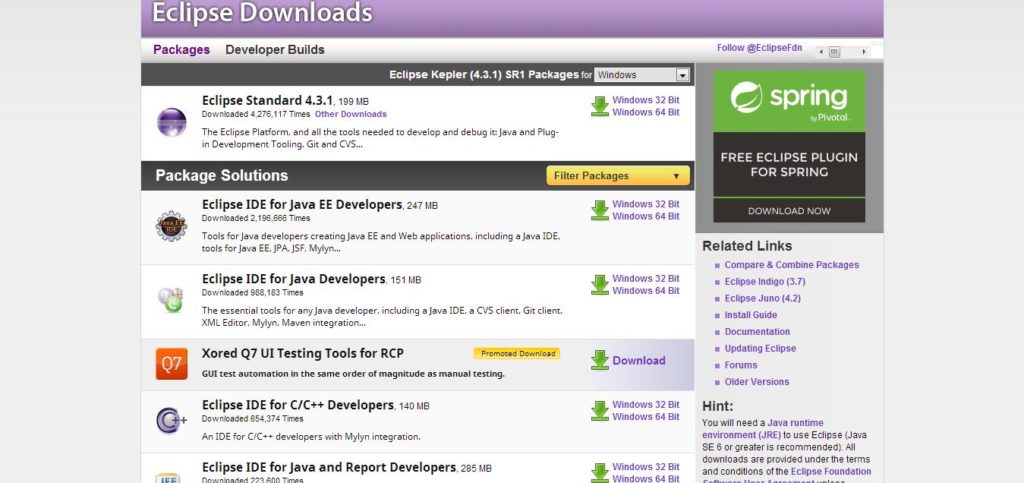
Eclipse is an integrated development environment in computer programming consisting a base workspace and an extensible plug-in system for customizing the environment. It is mostly used in Java. It is generally used to developing applications. By using various plug-ins you can use it other programming languages like C++, COBOL, Fortran, PHP. You can download the software from the below mentioned website https://www.eclipse.org/downloads/. After you visit the site then you may go to that site.

You may find the following screen shot after you visit the above website.

How to install Eclipse on Windows 7

  • Make sure that you are downloading the compatible software for your windows i.e; 32 bit or 64 bit.
  • To run Eclipse on a modern widows operating system with less than 1 GB of RAM may keep your computer very busy to operate.
  • At least 2 GB of RAM is recommended.
  • Also make sure that you are having a latest operating system along with a current version of web browsers.
  • There are a number of downloadable packages available in the website if you visit but the Eclipse Classic seems like it is perfect.
  • After you click the download button then a Zip file will be getting downloaded.
  • After the completion of downloads decompress the Zip file which will create the unzipped Eclipse folder.
  • If you want to extract the archive to C drive then you can extract it in that drive only.
  • After installing it then run the Eclipse.
  • The first time you will prompted to identify a location for your Eclipse Workspace.
  • This is where local copies of your projects will live in your computer.
  • It is advisable to pass JVM arguments to Eclipse at startup to reserve a larger memory space for the IDE than the default.
  •  If you have multiple installations of Java on your computer, and if the JVM that occurs first in your path environment variable is not the one in which Eclipse can run.

How to install Eclipse on Windows 7

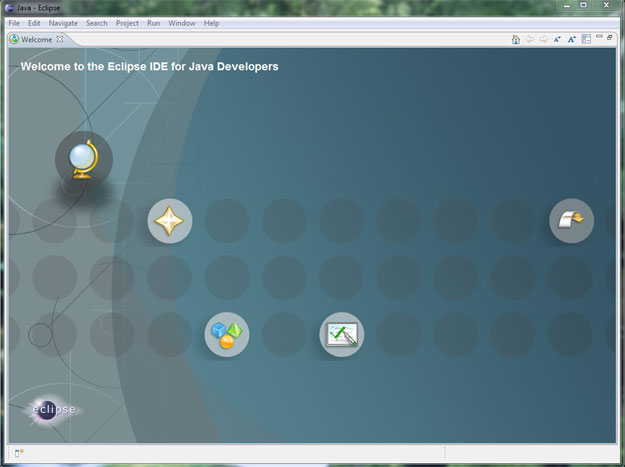
Launch screen of Eclipse

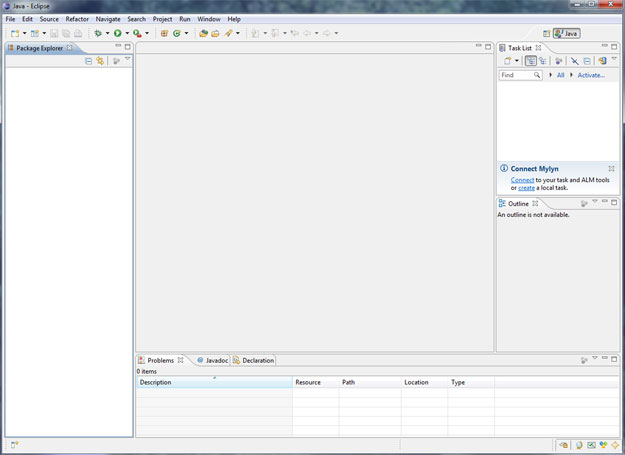
Eclipse run for First time

Connecting Java Documentation to Eclipse

  • Connect the Java documentation to Eclipse is little tedious.
  • It is very useful when developing programs.
  • Choose Preferences from the Eclipse tool bar.
  • There you will find a navigation tree, expand the Java option and click the installed JREs option.
  • In the installed JREs panel make sure the most current version of Java is checked. If you select yes then you have to select it and then click edit.
  • A Edit JRE window will pop up which shows a list of “JRE system libraries” and you need to link each library to the Java documentation.

Other Projects to Try:

  1. How to Install Visual Studio 6 on Windows 7
  2. How to install Apache tomcat on Windows 7
  3. TestPage
  4. How to install MySql on Windows
  5. Hello World Android Project with Source Code

Filed Under: Uncategorized

Collaborative Project Management Project Idea

March 7, 2014 by ProjectsGeek Leave a Comment

Collaborative Project Management Project Idea


Project Definition

To develop collaborative project management software. The software should be web based, i.e. should have a web based interface. The software should be platform and hardware independent, and should be accessible to anyone, anywhere who has a valid username and password combination.

Technology Used

  • PHP 5.0 Language
  • MySQL Database
  • Apache Web Server

Platform: Microsoft Windows XP Professional

Software Requirements:

  • WAMP Server (Windows, Apache, MySQL, PHP)
  • Web browser like Internet Explorer on client

Hardware Requirements

  • Server capable of running the WAMP server
  •  Client – any computer networked to server

Collaborative Project Management Project Description

The Collaborative Project Management is designed to be used as a groupware. It is termed so, as it allows many people to work together simultaneously lending it the name collaborative. This Collaborative Project Management particularly aims at reducing efforts on co-ordinating different tasks for a team working on one single project. Easy communication and reduction in production times is the main aim of this software. It will also allow geographically dispersed teams to tackle different tasks for one single project, making on-site and offshore work possible.

The mission or the purpose of the software is to provide a clean, consistent interface for software development management specifically tailored for the Open Source community. Collaborative features included are message boards for the developers to keep up to date, as to what their peers are working upon, and more specifically what problems they are facing. A calendar based To-Do list is also implemented, and the home page would list out the To-Do tasks set for today.

The coding should meet industry standards, thereby separating the design of the software with the server side scripting. This is achieved using the ‘include ()’ function of PHP 5.0, thus enabling the theme of the look of the software to be modifiable from one single file. Even the database connectivity code should be an included file thus enabling easy changes to each and every database aware page to be modified using a single change.

Keeping up with the current trends, the forum messages added, should be RSS 2.0 compatible. This enables users to view new forum messages directly from their feed readers without actually visiting the site. The primary advantage of this is that it allows developers to know when an update to the development cycle is available, and then they can view changes made to the software code as a whole. RSS has become a standard worldwide for providing XML based information across platforms, and serving up-to-date news feeds right down to the browser.

The main function of the Collaborative Project Management to enable project management features would be a unified to-do list, which is implemented as a viewable graphical calendar. This is achieved using a combination of the server side scripting language – PHP, and its client side scripting language – JavaScript, for making the graphical front end output of the calendar. This to-do list is then viewed on the home page, based upon today’s date along with the corresponding to-do tasks for today.

Other Projects to Try:

  1. Web Service for Multiple clients Project Idea
  2. E-Learning Management System Project Idea
  3. PHP projects with Source Code
  4. Remote Grammar Updation Module Project Idea
  5. Java Projects | VB Projects | PHP and ASP Net Projects

Filed Under: Uncategorized

  • « Go to Previous Page
  • Page 1
  • Page 2
  • Page 3
  • Page 4
  • Interim pages omitted …
  • Page 13
  • Go to Next Page »

Primary Sidebar

Tags

.Net Projects Download Android Project Ideas Android Projects Angular 2 Assembly Codes C # Projects C & C++ Projects C++ Projects Class Diagrams Computer Graphics Database Project Data Mining Projects DataScience Projects Datastructure Assignments Download Visual Basic Projects Electronics project Hadoop Projects Installation Guides Internet of Things Project IOS Projects Java Java Interview Questions Java Projects JavaScript JavaScript Projects java tutorial JSON JSP Projects Mechanical Projects Mongodb Networking Projects Node JS Projects OS Problems php Projects Placement Papers Project Ideas Python Projects seminar and presentation Struts

Search this Website


Footer

Download Java Project
Download Visual Basic Projects
Download .Net Projects
Download VB Projects
Download C++ Projects
Download NodeJs Projects
Download School Projects
Ask Questions - Forum
Latest Projects Ideas
Assembly Codes
Datastructure Assignments
Computer Graphics Lab
Operating system Lab
australia-and-India-flag
  • Home
  • About me
  • Contact Form
  • Submit Your Work
  • Site Map
  • Privacy Policy